Read internet speed test results without mixing up the units

A result of 100 Mbps does not mean a 100 MB file arrives in one second. I check the units before comparing an internet speed test with a download progress bar. The next check is the measurement method: a bounded HTTP sample and a long parallel test can both be working correctly while reporting different rates.
How is internet speed calculated?
The displayed rate is useful only when its interval is clear. Here the browser times a complete request, including the response body. Download bytes are received from Cloudflare; upload bytes are generated on your device and acknowledged by that service. Browser scheduling, connection setup, server response and the actual transfer all contribute to the elapsed duration. This method reports HTTP goodput across the whole operation, rather than isolating a theoretical cable capacity.
Consider two hypothetical one-MiB transfers. The first takes 100 ms and the second takes 200 ms. Their individual rates are 83.88608 Mbps and 41.94304 Mbps. Taking their simple mean gives 62.91456 Mbps, but that overweights the shorter interval. Combining 2,097,152 bytes and 300 ms gives 55.924053333 Mbps. That is the aggregate used by this tool. Keep the unrounded timings when checking the arithmetic, because displayed rounding can hide the small differences.
What is the difference between Mbps and MB/s?
Lowercase b means a bit; uppercase B means a byte, and eight bits make one byte. Mbps is millions of bits per second. MB/s is millions of bytes per second. Divide Mbps by eight to get MB/s, or multiply MB/s by eight for Mbps. A connection result of 80 Mbps is therefore 10 MB/s. A file-transfer application showing 10 MB/s is consistent with that figure before allowing for additional transfer overhead.
Binary MiB adds another distinction. One MiB contains 1,048,576 bytes, while a decimal MB contains 1,000,000 bytes. The test-size selector uses MiB so its requested bytes are exact. The file-time field uses decimal MB and says so beside the input. If your application displays MiB/s, convert that value to bytes before comparing it with a decimal MB/s result. Do not assume that every program uses the same abbreviation correctly.
| Mbps | MB/s | Ideal time for 100 MB |
|---|---|---|
| 20 | 2.5 | 40 seconds |
| 80 | 10 | 10 seconds |
| 100 | 12.5 | 8 seconds |
| 250 | 31.25 | 3.2 seconds |
What do latency and jitter mean?
High throughput does not guarantee a quick response to each small action. An idle HTTP latency measurement times a zero-byte request; it still needs a response, headers and browser work. This is not an ICMP ping, and it is not the delay to every game or call server. The warm-up request is excluded so the following six probes provide a more comparable sequence within this particular run.
Median latency uses the central value, or the mean of the two central values for an even sample count. For 10, 30, 20, 40, 15 and 25 ms, the median is 22.5 ms. Jitter uses the original order: absolute changes are 20, 10, 20, 25 and 10 ms, averaging 17 ms. Those figures describe this six-probe HTTP sequence. There is no packet-loss measurement and no invented percentage derived from the number of successful requests.
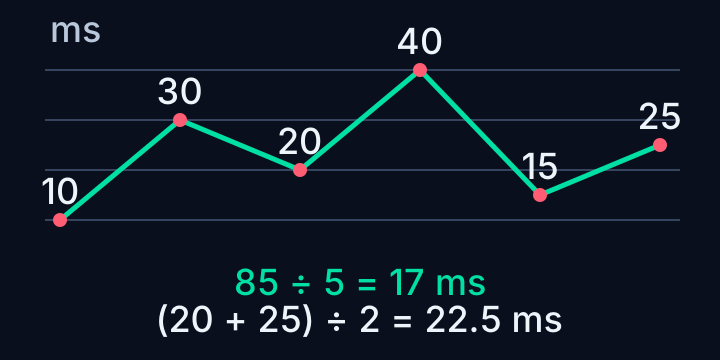
Why is loaded latency sometimes unavailable?
The first download and first upload each run alongside a separate zero-byte HTTP probe. A loaded reading is displayed only if that probe's entire interval falls inside the corresponding transfer. A fast transfer can end before the probe finishes; in that case the field explains that Standard may provide a longer interval. An unavailable loaded reading is not evidence of packet loss or a broken connection.
I compare idle and loaded figures only after checking that the conditions match. A higher response time during a transfer can indicate competition for a shared connection, but this small browser check does not identify the exact cause. Router queues, device scheduling, Wi-Fi contention and service timing can all contribute. It would be misleading to diagnose a specific router fault from one short concurrent response or label it a certified bufferbloat grade.
Why do different speed tests give different results?
Quick transfers 0.625 MiB of requested download and generated upload bytes in total; Standard transfers 10 MiB. Both have extra header and connection traffic. A small sample is attractive on a metered connection, but a transfer completed in less than 100 ms has little duration over which to average scheduling and startup effects. The result remains visible with a practical suggestion to use the larger mode.
Different tests use different servers, connection counts, durations and summary statistics. FAST exposes duration and parallel-connection settings, while Cloudflare's engine documentation describes its own measurement approach. This site's fixed sequential transfer samples are not interchangeable with those longer tests. Compare like with like before treating a difference as evidence that your provider changed your service.
How can I save and compare speed test results?
Start with the internet speed test, note the mode and connection type, then explicitly save a complete result if you want it later. Keep the device, Wi-Fi position, VPN state and background activity consistent across comparisons. Changing just one condition makes a difference easier to investigate. A saved result retains its own measurement time and mode; opening it does not spend more test traffic.
Use the CSV when you want original numerical precision, or TXT when you want a readable report. Both include the method and limits, so a copied rate does not become detached from its meaning. Cloudflare receives the connection metadata and generated test traffic; the report is produced locally without copying address or location headers. If a request fails, the tool stops and shows the failure rather than manufacturing a zero that could distort your comparison.
If the numbers change when you move rooms, follow the controlled Wi-Fi comparison before adjusting several router settings.
Frequently asked
Is 100 Mbps the same as 100 MB/s?
No. Divide Mbps by eight: 100 Mbps is 12.5 MB/s before further transfer overhead.
Why does a longer test show a different rate?
It may use a different server, duration, connection count or summary statistic. Compare matching methods and conditions.
Is jitter calculated from sorted latencies?
No. This tool uses absolute differences between consecutive responses in their original order. Sorting is used only for the median.